Posts for: #Vmware

Installing vCenter Server 8 (VCSA) and Clustering 3 ESXi Hosts

🧩 Problem

I wanted to bring my 3 separate ESXi hosts (running on local storage, no shared storage/NAS) under centralized management by deploying vCenter Server Appliance (VCSA) 8.0.3, then clustering all 3 hosts together.

Along the way, I hit a persistent firstboot failure that took significant troubleshooting to root-cause:


Error

The supplied System Name <hostname> is not valid.


Resolution

If the supplied system name is a FQDN, then make sure the DNS forward lookup

results in at least one valid IP address in the system. If the supplied

system name is an IP address, then it should be one of the valid IP

address(es) in the system.

This happened with both vcenter.local and vcenter.lab as the FQDN, despite DNS appearing to be configured correctly.
[Read more →]

Migrating VMs from VMware Workstation 25H2 to ESXi 8

🧩 Problem

I had several Windows VMs running in VMware Workstation 25H2 on my Windows PC and wanted to migrate them across to my ESXi 8 host (esx03) for centralized management under vCenter.

Along the way I hit two blockers in sequence:

  1. vmx-22 hardware family not supported during OVF import into ESXi 8

  2. vTPM encryption requirement — the VM failed to create because it had a virtual TPM but VM encryption wasn’t configured on the standalone host

[Read more →]

Building a Hybrid Cloud Monitoring Stack with Zabbix, ZeroTier, and Azure

🧩 Problem

I wanted a centralized monitoring platform for my homelab that could monitor:

  • On-premises VMware ESXi hosts
  • Linux virtual machines
  • Windows systems
  • HPE iLO hardware management
  • Cloud-hosted workloads

The challenge was that most of my infrastructure lives behind NAT at home, and I did not want to expose services publicly or configure complex port forwarding.


🛠️ Solution Overview

I built a hybrid monitoring architecture using:

  • Zabbix 7.0 LTS hosted in Azure
  • ZeroTier for secure private connectivity
  • Zabbix Proxy running locally in my homelab
  • VMware API monitoring for ESXi
  • SNMP monitoring for HPE iLO

This design allows cloud-hosted monitoring while keeping home infrastructure private.

[Read more →]

Installing ESXi 8 on Dell OptiPlex (Fixing Pink Screen of Death - CPU Mismatch)

🧩 Problem

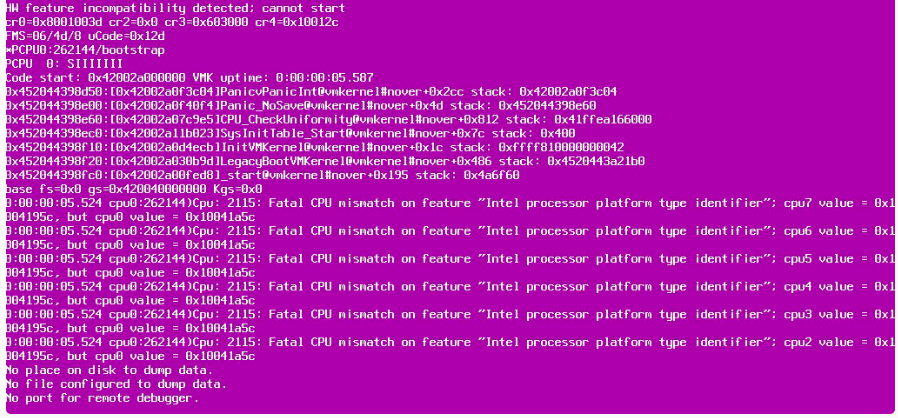
I attempted to install ESXi 8 on my Dell OptiPlex homelab machine, but during boot, I encountered a Pink Screen of Death (PSOD) with errors like:

  • Fatal CPU mismatch on feature
  • HW feature incompatibility detected

This prevented ESXi from installing or booting successfully. !Image Description

🛠️ Root Cause

The issue is caused by modern Intel CPUs (12th Gen and newer) using a hybrid architecture with:

  • Performance cores (P-cores)
  • Efficiency cores (E-cores)

ESXi expects uniform CPU cores, so it crashes when it detects different core types.

[Read more →]