Building a Hybrid Cloud Monitoring Stack with Zabbix, ZeroTier, and Azure

🧩 Problem

I wanted a centralized monitoring platform for my homelab that could monitor:

  • On-premises VMware ESXi hosts
  • Linux virtual machines
  • Windows systems
  • HPE iLO hardware management
  • Cloud-hosted workloads

The challenge was that most of my infrastructure lives behind NAT at home, and I did not want to expose services publicly or configure complex port forwarding.


🛠️ Solution Overview

I built a hybrid monitoring architecture using:

  • Zabbix 7.0 LTS hosted in Azure
  • ZeroTier for secure private connectivity
  • Zabbix Proxy running locally in my homelab
  • VMware API monitoring for ESXi
  • SNMP monitoring for HPE iLO

This design allows cloud-hosted monitoring while keeping home infrastructure private.

[Read more →]

AdGuard setup for blocking ads

Network-wide ad blocking using AdGuard Home deployed as a VM on ESXi. Blocks ads, trackers, and malicious domains at the DNS level — before they reach any device on the network.


🖥️ Environment

  • Hypervisor: VMware ESXi
  • VM OS: Ubuntu Server 24.04 LTS
  • VM Specs: 3 vCPU, 4 GB RAM, 60GB disk
  • AdGuard Home Version: Latest stable

🚀 Step 1: Create the VM on ESXi

Created a new VM in the ESXi web UI with the following settings:

[Read more →]

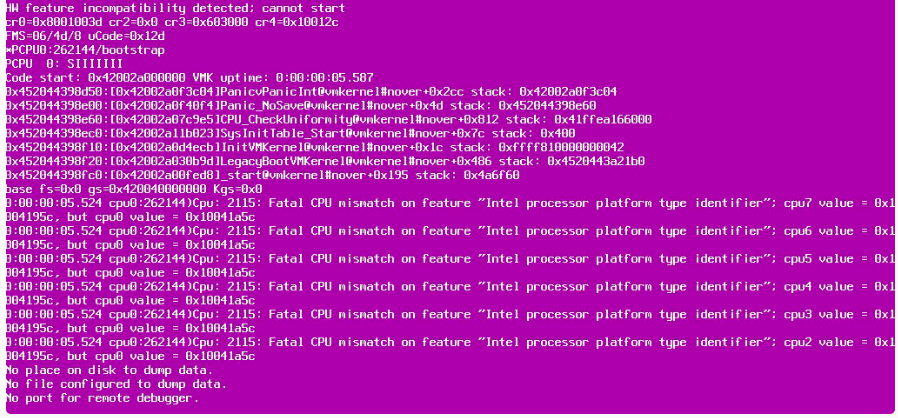
Installing ESXi 8 on Dell OptiPlex (Fixing Pink Screen of Death - CPU Mismatch)

🧩 Problem

I attempted to install ESXi 8 on my Dell OptiPlex homelab machine, but during boot, I encountered a Pink Screen of Death (PSOD) with errors like:

  • Fatal CPU mismatch on feature
  • HW feature incompatibility detected

This prevented ESXi from installing or booting successfully. !Image Description

🛠️ Root Cause

The issue is caused by modern Intel CPUs (12th Gen and newer) using a hybrid architecture with:

  • Performance cores (P-cores)
  • Efficiency cores (E-cores)

ESXi expects uniform CPU cores, so it crashes when it detects different core types.

[Read more →]

Setting up Cloudflare DDNS on Ubuntu for Dynamic Home IP


title: Setting up Cloudflare DDNS on Ubuntu using cloudflare-ddns-updater date: 2026-03-20 draft: false tags:

  • cloudflare
  • ddns
  • homelab
  • ubuntu
  • automation

🧩 Problem

My home network uses a dynamic public IP address, which changes periodically. This breaks remote access to my self-hosted services.


🛠️ Solution Overview

I used an open-source tool (cloudflare-ddns-updater) to automatically update my Cloudflare DNS records whenever my public IP changes.


🔧 Environment

  • Ubuntu Server (DDNS host)
  • Cloudflare domain
  • API Token with DNS edit permissions
  • Git installed

🚀 Step 1: Create Cloudflare API Token

  1. Log in to Cloudflare
  2. Go to My Profile → API Tokens
  3. Create a token with:
    • Zone → DNS → Edit
    • Zone Resources → Specific Zone (your domain)

Save the token securely.

[Read more →]

Setting up Wazuh SIEM with SSH Brute Force Attack Detection and Mitigation

🧩 Problem

I wanted to simulate a real-world security environment in my homelab where I could detect and respond to SSH brute-force attacks and at the same time monitor my devices


🛠️ Solution Overview

I deployed Wazuh as a SIEM solution and configured it to detect SSH login attempts and automatically block malicious IPs.


🔧 Environment

  • Ubuntu Server (Wazuh Manager)
  • Linux target machine (with SSH enabled)
  • Public exposure via port forwarding

🚀 Step 1: Install Wazuh

curl -sO https://packages.wazuh.com/4.14/wazuh-install.sh && sudo bash ./wazuh-install.sh -a

After installation, accessed dashboard:

[Read more →]