Building a Hybrid Cloud Monitoring Stack with Zabbix, ZeroTier, and Azure
🧩 Problem#
I wanted a centralized monitoring platform for my homelab that could monitor:
- On-premises VMware ESXi hosts
- Linux virtual machines
- Windows systems
- HPE iLO hardware management
- Cloud-hosted workloads
The challenge was that most of my infrastructure lives behind NAT at home, and I did not want to expose services publicly or configure complex port forwarding.
🛠️ Solution Overview#
I built a hybrid monitoring architecture using:
- Zabbix 7.0 LTS hosted in Azure
- ZeroTier for secure private connectivity
- Zabbix Proxy running locally in my homelab
- VMware API monitoring for ESXi
- SNMP monitoring for HPE iLO
This design allows cloud-hosted monitoring while keeping home infrastructure private.
🏗️ Architecture Overview#
[Azure Zabbix Server]
            │
      (ZeroTier VPN)
            │
 ┌──────────┴──────────┐
 │                     │
[Remote Hosts]    [Zabbix Proxy]
 Linux/Windows       (Homelab)
                         │
         ┌───────────────┼──────────────┐
         │               │              │
      [ESXi 01]      [ESXi 02]      [HPE iLO]
      VMware API     VMware API        SNMP
Why This Design?#
Instead of exposing home infrastructure to the internet:
- Remote hosts connect directly over ZeroTier
- LAN-only systems are monitored through a local Zabbix Proxy
- The proxy forwards monitoring data securely to Azure
This gives me:
✅ Centralized monitoring
✅ No inbound home firewall exposure
✅ Better scalability for future labs or remote sites
🔧 Environment#
Cloud Environment (Azure)#
| Component | Details |
|---|---|
| VM Type | Standard B2ats v2 |
| OS | Ubuntu Server 24.04 LTS |
| Monitoring Platform | Zabbix 7.0.25 LTS |
| Database | MariaDB 10.11 |
| Web Server | Apache2 |
| SSL | Let’s Encrypt |
| DNS | Cloudflare |
Homelab Environment#
| Device | Purpose |
|---|---|
| Dell OptiPlex | ESXi Hypervisor |
| HP MicroServer Gen8 | ESXi Hypervisor |
| HPE iLO 4 | Hardware Monitoring |
| Ubuntu VM | Zabbix Proxy |
| ZeroTier | Overlay Networking |
🚀 Part 1: Deploying Zabbix Server in Azure#
Step 1: Create the Azure VM#
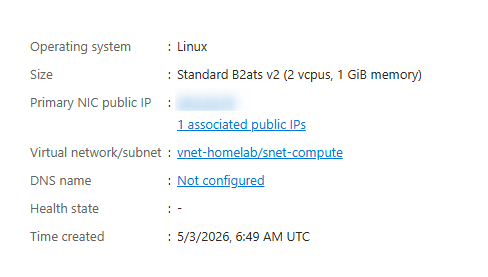
Using my Azure for Students subscription, I created:
VM Size: Standard_B2ats_v2
OS: Ubuntu Server 24.04 LTS
Region: Australia East
Authentication: SSH Key
I intentionally selected a smaller VM to reduce resource usage.
!
Step 2: Add Swap Memory#
Since the VM only had 1 GB RAM, I added a 2 GB swapfile to avoid memory pressure during MariaDB and Zabbix operations.
sudo fallocate -l 2G /swapfile
sudo chmod 600 /swapfile
sudo mkswap /swapfile
sudo swapon /swapfile
echo '/swapfile none swap sw 0 0' | sudo tee -a /etc/fstab
This significantly improved stability.
Step 3: Install ZeroTier#
To securely connect my home lab to Azure:
curl -s https://install.zerotier.com | sudo bash
sudo zerotier-cli join YOUR_NETWORK_ID
After approval in the ZeroTier portal, the VM received a private overlay IP.
This became the primary communication path between my monitoring server and remote systems.
Step 4: Install Zabbix 7.0 LTS#
Installed required packages:
wget https://repo.zabbix.com/zabbix/7.0/ubuntu/pool/main/z/zabbix-release/zabbix-release_latest_7.0+ubuntu24.04_all.deb
sudo dpkg -i zabbix-release_latest_7.0+ubuntu24.04_all.deb
sudo apt update

sudo apt install -y \
zabbix-server-mysql \
zabbix-frontend-php \
zabbix-apache-conf \
zabbix-agent2 \
zabbix-sql-scripts
Step 5: Configure MariaDB#
Created the database:
sudo mysql -u root
CREATE DATABASE zabbix CHARACTER SET utf8mb4 COLLATE utf8mb4_bin;
CREATE USER 'zabbix'@'localhost' IDENTIFIED BY 'StrongPassword';
GRANT ALL PRIVILEGES ON zabbix.* TO 'zabbix'@'localhost';
FLUSH PRIVILEGES;
Imported schema:
zcat /usr/share/zabbix-sql-scripts/mysql/server.sql.gz | \
mysql -uzabbix -p zabbix
Step 6: Configure SSL#
To securely expose the dashboard:
sudo apt install certbot python3-certbot-apache -y
sudo certbot --apache
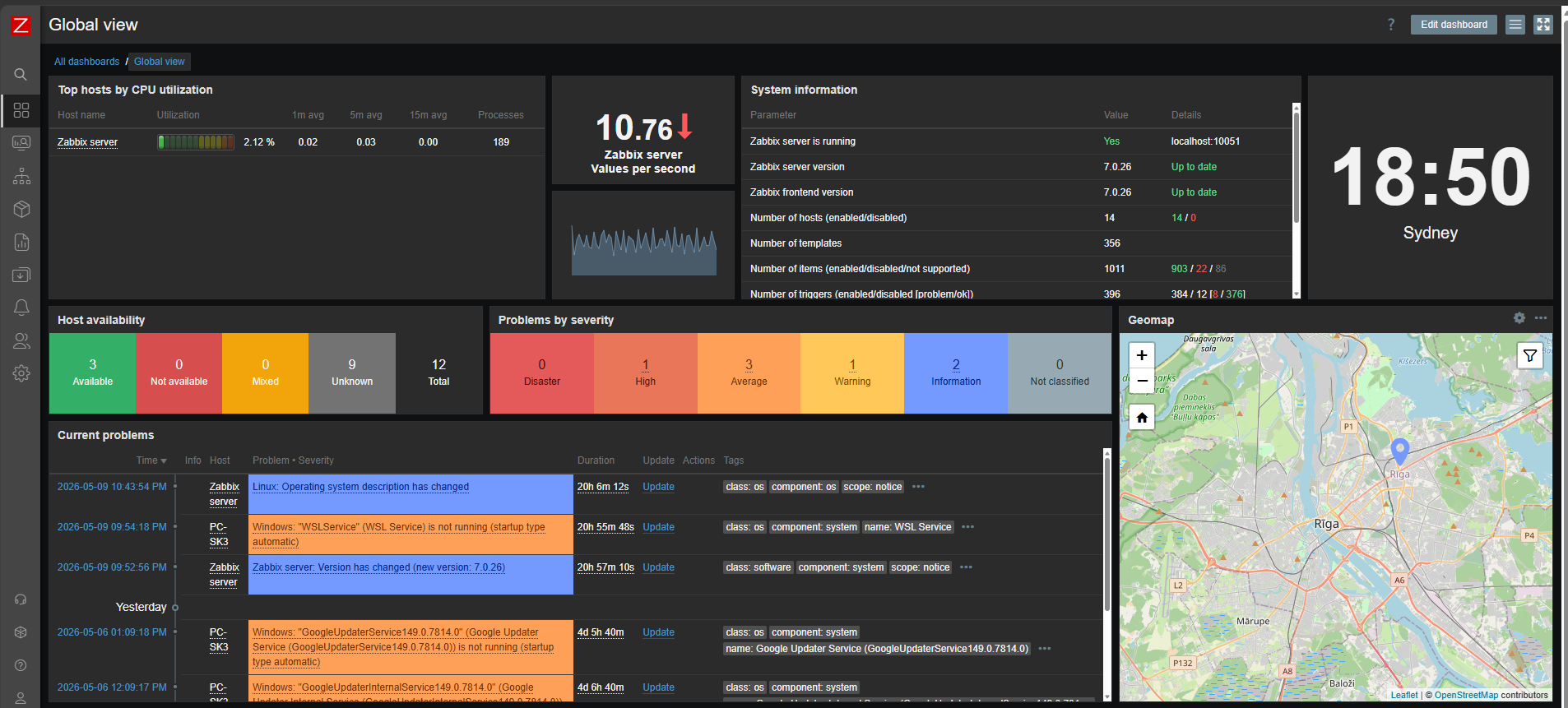
Final dashboard URL:
https://your.domain.com/zabbix
! #
#
📡 Part 2: Monitoring Remote Hosts with ZeroTier#
For systems outside my LAN:
- Windows machines
- Linux VMs
- Wazuh server
I installed:
- ZeroTier agent
- Zabbix Agent 2
Example Linux installation:
sudo apt install zabbix-agent2 -y
Updated:
Server=YOUR-ZABBIX-ZEROTIER-IP
ServerActive=YOUR-ZABBIX-ZEROTIER-IP
This allowed agents to communicate securely without public exposure.
🔁 Part 3: Deploying a Local Zabbix Proxy#
Why Use a Proxy?#
Some systems in my homelab:
- ESXi hypervisors
- HPE iLO
- Internal VMs
should remain LAN-only.
Instead of installing ZeroTier everywhere, I deployed a Zabbix Proxy VM inside ESXi.
The proxy:
- Collects monitoring data locally
- Talks to ESXi APIs
- Queries SNMP devices
- Sends everything securely to Azure
Proxy Configuration#
Installed:
sudo apt install \
zabbix-proxy-sqlite3 \
zabbix-agent2 -y
Updated:
sudo nano /etc/zabbix/zabbix_proxy.conf
Configured:
Server=YOUR-ZABBIX-ZEROTIER-IP
Hostname=zabbix-proxy-homelab
ProxyMode=0
StartVMwareCollectors=2
🖥️ Part 4: Monitoring VMware ESXi#
Instead of agents, I used the VMware API.
Configured host macros:
{$VMWARE.URL}
{$VMWARE.USERNAME}
{$VMWARE.PASSWORD}
Using templates:
VMware
VMware Hypervisor
This automatically discovered:
- Hypervisor health
- CPU & memory usage
- Datastores
- Virtual machines
🔋 Part 5: Monitoring HPE iLO via SNMP#
Enabled SNMP in iLO:
Community: public
Port: 161
Version: SNMPv2
Validated connectivity:
snmpwalk -v2c -c public 192.168.1.4
Applied template:
HP iLO by SNMP
This gave visibility into:
- Temperature
- Fans
- Hardware health
- Power supply status
- Firmware information
⚠️ Challenges Faced#
1. MariaDB Database Error#
After installation:
Database error
No such file or directory
Cause: MariaDB service stopped.
Fix:
sudo systemctl start mariadb
2. Azure VM Resource Constraints#
1 GB RAM was insufficient during setup.
Adding swap solved memory pressure.
3. ESXi Monitoring Over ZeroTier#
Installing ZeroTier directly on ESXi was not ideal.
A local proxy provided a cleaner and more scalable architecture.
📊 Final Result#
My monitoring stack now includes:
✅ VMware ESXi monitoring
✅ Linux & Windows monitoring
✅ HPE iLO hardware health
✅ Cloud + on-prem visibility
✅ Secure connectivity without port forwarding
✅ HTTPS dashboard via Cloudflare & Let’s Encrypt
🧠 What I Learned#
- Hybrid monitoring architecture design
- Secure networking using ZeroTier
- VMware monitoring through APIs
- Zabbix Proxy deployment patterns
- Cloud-hosted monitoring best practices
🚀 Future Improvements#
- Telegram/email alerting
- Monitoring Docker containers
- Grafana dashboards
- HA Zabbix deployment